
CardPointers Review: Maximize Your Credit Card Benefits With This App
Look, I spend a lot of time thinking about credit card optimization. It’s literally what I do.
I track bonus categories across multiple cards. I know which issuers have the best transfer partners for points and miles. I can tell you off the top of my head what CPP you should be aiming for when booking award flights. This is my world.
But I was still spending way too much time manually clicking through Amex Offers, setting reminders for annual credits, and doing mental math at checkout. I needed an easy button.
That’s where CardPointers comes in. Because remembering everything in real time is basically impossible when you’re juggling rotating categories, limited-time offers, and a bunch of “use it or lose it” annual credits that expire when you’re not looking.
The app has basically become my credit card co-pilot. And before you roll your eyes at yet another “game-changing” tool, hear me out: this one actually delivers.
CardPointers Review
What the CardPointers App Actually Does
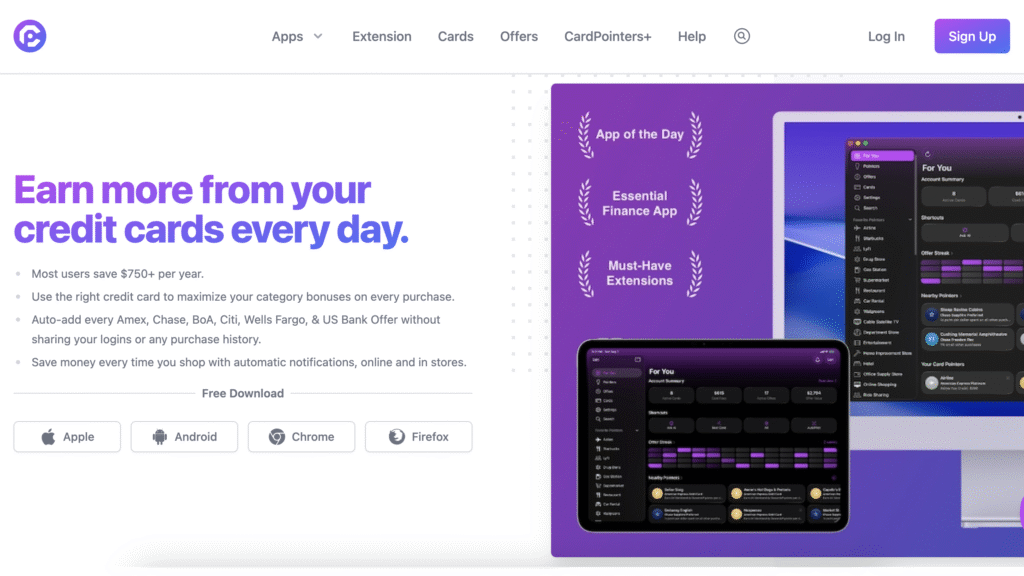
CardPointers is a rewards app (iOS and Android) that does one thing really, really well: it tells you which credit card to use, when to use it, and what benefits you’re about to forget about.
Here’s what it tracks:
- Bonus categories across all your cards (yes, even those random Q4 5x categories you forgot to activate)
- Active card offers from Amex, Chase, and other issuers
- Welcome bonuses and MSR progress so you’re never guessing how much more you need to spend
- Annual credits and benefits with actual reminders before they expire
- Bank rules like Chase’s 5/24, so you’re not applying blindly
- Travel protections you probably didn’t know your card had
The free version gives you solid foundational features. The Pro version? That’s where things get interesting.
5 Things to Know About the CardPointers App
1. Benefit Credit Reminders (AKA: Stop Throwing Money Away)
This is the big one for me. I can’t tell you how many times I’ve realized in like… February… that I never used my $200 airline credit or other statement credits from the previous year. Or that my $15/month Uber Cash just evaporated because I forgot it existed.
CardPointers sends you push notifications before these credits expire. It also reminds you about upcoming annual fees, which is clutch when you’re deciding whether to keep a card or cancel before the fee hits.
It’s not revolutionary technology. It’s just actually useful in a way that makes you wonder why the card issuers don’t do this themselves. (Spoiler: they benefit when you forget.)
Real talk: This feature alone has probably saved me $300+ annually in credits I would’ve otherwise lost.
2. Automatic Offer Syncing (Goodbye, Manual Amex Offer Clicking)
If you’ve ever spent 20 minutes clicking through Amex Offers or Chase Offers trying to add everything that might be relevant… You know the pain.
CardPointers Pro can auto-add offers across your cards. All of them. In seconds.
I did the math: I’m probably saving 2-3 hours per month by not having to comb through offers manually. And I’m actually using more offers now because they’re all visible in one place when I’m shopping.
3. Finding the Best Card to Use, Answered Instantly
You’re standing in Walgreens. You have fourteen credit cards in your digital wallet (don’t judge). Which one do you use?
With CardPointers, you can search by merchant or category, and it’ll show you your best option based on:
- Current bonus categories
- Active offers on your cards
- SUB progress (if you’re working toward one)
The browser extension does this too, though I’ll admit it can be a little clunky depending on how many card offers have been added (cough, probably why). But the mobile app? Flawless for on-the-go decisions.
4. Autopilot Mode for Local Shopping
This is a newer feature I’ve been testing, and it’s honestly pretty slick: Autopilot shows you nearby offers and recommends which card to use based on where you are.
Perfect for when you’re out running errands and want to maximize every swipe without overthinking it.
5. CardPointers Extension: Your Browser Shopping Sidekick
CardPointers also offers a browser extension (Chrome, Safari, Edge) that brings two key features right into your browser while you’re shopping online.
First, it recommends which card to use for the site you’re on. Just like the mobile app does, it’ll show you which card gets the highest category rewards, or if you’re working on a card sign-up bonus that makes sense for that purchase.
Second, you can search all your active offers directly in the extension without switching to your banking app or even opening CardPointers on your phone. You can see offer details, which cards they’re active on, and whether that random retailer you’re browsing has any offers you’ve already added.
It’s especially useful for those random online purchases where you wouldn’t have thought to check your offers otherwise. The extension catches opportunities you’d probably miss—which is kind of the whole point of CardPointers in the first place.
CardPointers Free vs Pro: Is It Worth Paying For?
The free version is solid if you’re just dipping your toes into points optimization. But if you’re serious about maximizing rewards (and let’s be real, if you’re reading this, you probably are), Pro is where the magic happens.
What you get with Pro:
- Instant syncing of all card offers across issuers
- Personalized filters (business cards, no foreign transaction fees, Player 2, etc.)
- Bulk offer management
- Multi-profile tracking if you’re managing cards for a partner or family member
- Priority support
Standard pricing is $90/year for Pro. But right now, through July 5, you can grab it for 50% off, bringing it down to $45/year—only $3.75/month (Yeah, that’s less than a latte.)
There’s also a Lifetime option for $140 (standard price $280) if you’d rather pay once and be done with it.
How CardPointers Helps You Maximize Your Credit Card Rewards
Whether you’re optimizing for points, miles, or cash back, this app is perfect for you if:
- You have 3+ credit cards and struggle to remember which one to use where
- You’re tired of manually checking for card offers
- You’ve ever forgotten to use an annual credit (we’ve all been there)
- You’re working on multiple SUBs and want to track progress without spreadsheets
- You want to optimize your everyday spending without doing mental math every time you check out
This app might not be for you if:
- You only have one or two cards and aren’t planning to expand
- You’re more interested in new card bonuses than maximizing existing ones (though the SUB tracking is still helpful)
- You prefer manual tracking and don’t mind the time investment
CardPointers App Review: Final Thoughts
Here’s my take: if you have multiple rewards credit cards and you care about optimization, CardPointers is a no-brainer.
The free version alone will probably save you from missing at least one annual credit or forgetting to activate a lucrative offer. The Pro version? That’s for anyone who’s serious about squeezing every last point and dollar out of their cards without turning it into a part-time job.
I’ve been using it for months now, and it’s genuinely changed how I approach everyday spending.
Download CardPointers and see what you’ve been missing. (And seriously, grab that 50% off deal by March 31 if you’re even remotely interested in Pro.)
Have you tried CardPointers? What’s your favorite feature, or what’s keeping you from pulling the trigger? Drop a comment and let’s compare notes.
Frequently Asked Questions
Is CardPointers free?
Yes, CardPointers offers a free version with core features. CardPointers Pro ($90/year) unlocks automatic offer syncing, real-time pointers, multi-profile tracking, and advanced filters.
Does CardPointers work with all credit cards?
CardPointers works with virtually all major credit cards from Chase, Amex, Citi, Capital One, and more. You manually add your card type (not card numbers) to the app, and it tracks your categories, benefits, and offers.
How does CardPointers automatically add my Amex and Chase offers?
With CardPointers Pro, you can optionally link your accounts, and the app automatically syncs and adds available offers to your cards—no more manual clicking. This feature alone saves hours every month.
What’s the difference between CardPointers and Max Rewards?
Both apps help you optimize credit card usage, but CardPointers focuses more on offer management and benefit tracking while Max Rewards emphasizes card recommendations.
Does CardPointers work on iPhone and Android?
Yes, CardPointers is available for both iOS and Android, plus there’s a browser extension for Chrome, Safari, and Edge.
Editor’s note: Opinions shared in this article are solely the author’s and do not represent the views of any bank, credit card issuer, hotel, airline, or other organization. The content has not been evaluated, approved, or endorsed by any of the mentioned entities. These are our recommendations but it isn’t financial advice. We may receive a commission if you click through any of the links in this article.
Share this article:

I will right away take hold of your rss feed as I can’t to find your e-mail subscription link or e-newsletter service. Do you have any? Kindly permit me realize so that I could subscribe. Thanks.