Savewise Review: Compare Cashback Portals and Card-Linked Offers in 1-Click
Let me tell you about the last time I almost left $50 on the table.
I was ordering dog food (because my golden retriever eats better than I do), and I remembered to check Rakuten like a responsible points person—cool, 4% back. But something told me to dig deeper, and that’s when I found a 30% offer through a different portal I always forget to use, PLUS a $20 Amex Offer sitting there waiting to be activated.
$30 from the portal + $20 from Amex on a $100 purchase I was making anyway.
The problem? Who has time to manually check dozens of shopping portals and then remember which credit cards have offers?
Enter Savewise—the shopping tool that’s like having a rewards-obsessed friend whisper “wait, check this first” every time you’re about to check out online.
Savewise Review
What Is Savewise (And Why Should You Care)?
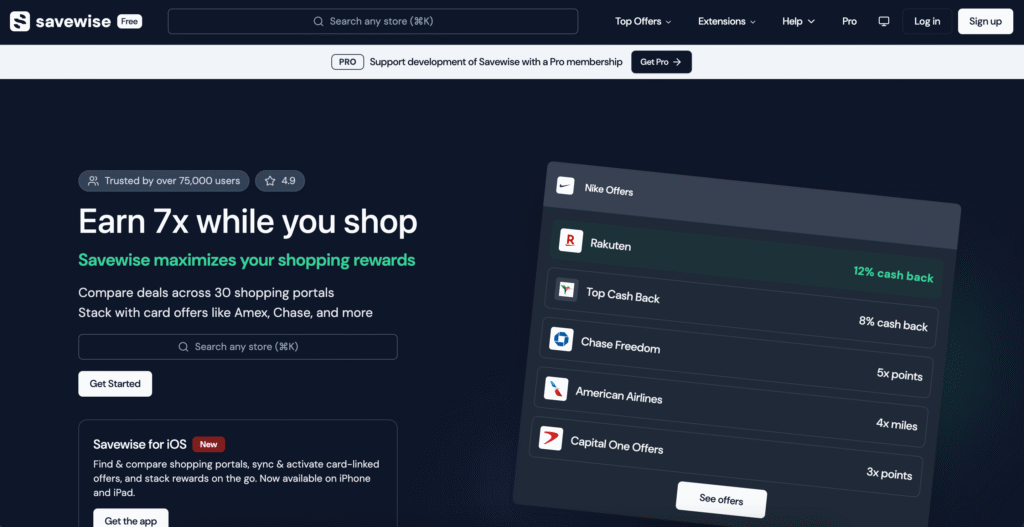
Savewise is a free website, browser extension, and app that does something beautifully simple: it shows you the best cash back rates across every shopping portal that matters, plus publicly available card-linked offers, all in one glance.
No more opening 14 tabs. No more “wait, does Southwest have a portal?” moments. No more forgetting that random portal that’s running 15% back this week.
It’s not just Rakuten vs. TopCashback. It’s showing you Rakuten vs. TopCashback vs. Southwest Rapid Rewards Shopping vs. Alaska Mileage Plan Shopping vs. every airline and hotel portal you didn’t even know existed vs. that random cash back site offering the best rate this week.
And it shows you whether Chase or Amex has a credit card offer ready to stack. They will soon add card-linked offers from Citi, Wells Fargo, and Bank of America.
How Savewise Works
You can use Savewise in three ways: through the website, via the browser extension, or on the mobile app.
Getsavewise.com
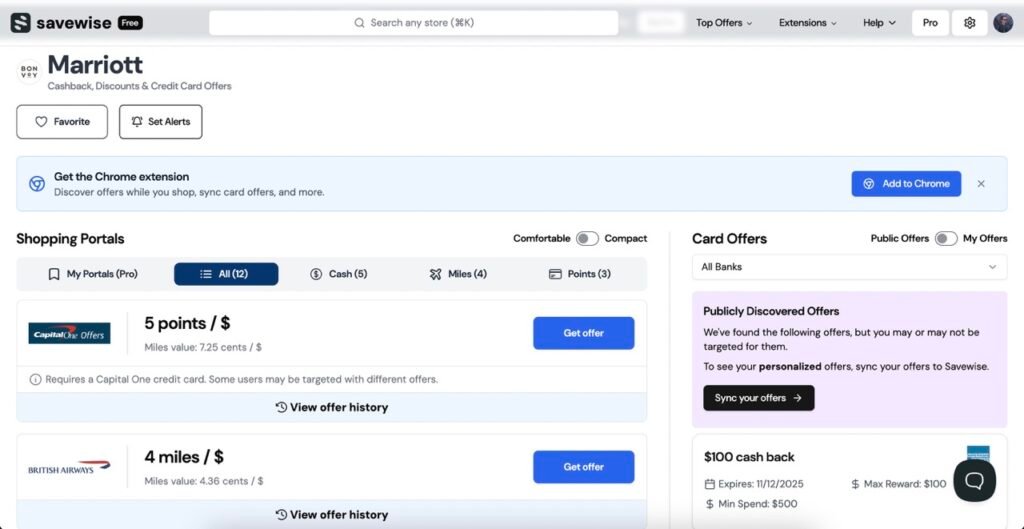
Head to the website, search for any store, and you’ll instantly see a clean list of every portal offering cash back for that store, sorted by the best rate. You can toggle between cash back, points, and miles. Plus, you’ll see publicly available card-linked offers from Amex, Chase, Rakuten, and SimplyMiles—all in one view.
Savewise Mobile App
Available for iOS, the mobile app gives you the same shopping portal and offers comparisons, plus public card-linked offer visibility, when you’re shopping on your phone. You manually search for stores (it doesn’t auto-detect like the extension), but you get all the same data.
Both give you one-click activation. Click the portal you want, get redirected (with tracking properly intact), and shop like normal.
That’s it. No complicated setup. No learning curve. It just… works.
Savewise Pricing: Free vs Pro
The Savewise Free Version Gets You Pretty Far
Let’s be real: the free version of Savewise is good. You get:
- Cash back comparisons across 20+ portals
- Public card-linked offer visibility (Amex, Chase, etc.)
- Basic store search
- The core functionality that saves you money
For a lot of people, that’s enough. If you’re the type who shops online a few times a month and wants to make sure you’re not leaving money on the table, the free version delivers.
But here’s where it gets interesting…
Why Savewise Pro Is Worth the Upgrade
The Pro version (the cost of one latte per month) transforms Savewise from “handy tool” to “how did I live without this.”
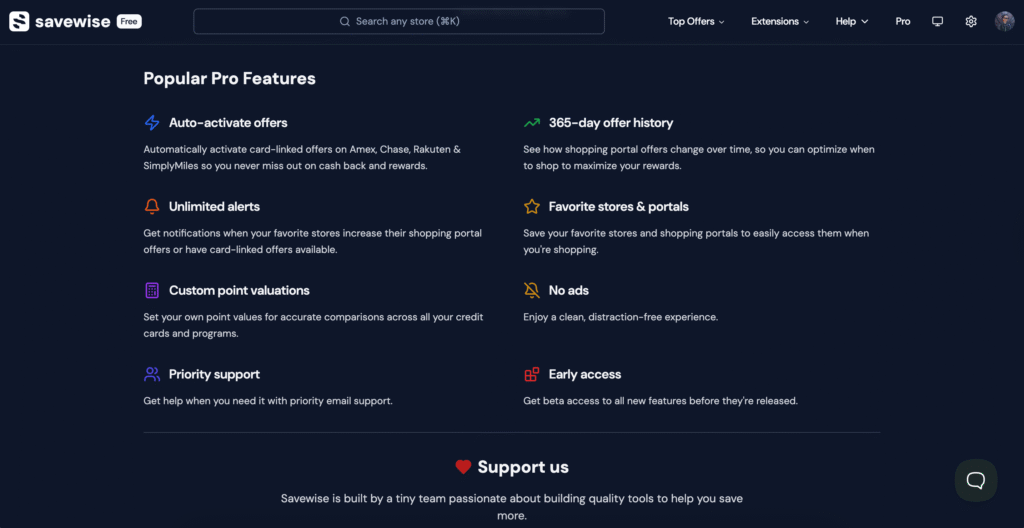
1. Auto-Activate Card Offers
This one’s huge. Pro automatically activates credit card offers from Amex, Chase, Rakuten, and SimplyMiles so you never miss out. Plus, it syncs “My Offers”—the specific offers you have active on your cards, not just the public offers everyone can see, but might not have available to them.
No more “I swear there was an Amex Offer for this, but I forgot to activate it.” It just happens in the background while you’re living your life.
2. 365-Day Offer History
Ever wonder if that “7% back” deal is actually good, or if this store regularly runs 10%?
Pro shows you a full year of historical data so you can see exactly how portal rates fluctuate. This is next-level optimization for anyone willing to wait for a better rate.
3. Unlimited Alerts
Set up notifications for your favorite stores so you get pinged when rates are boosted, especially clutch during Q4 when portals are constantly one-upping each other.
4. Custom Point Valuations
Here’s where the nerds (affectionate) will geek out: you can set your own CPP valuations for different programs.
Suppose you value UR at 1.8 cents per point and Southwest points at 1.4 cpp. In that case, Savewise calculates the actual value of each portal option based on your redemption strategy—not some general industry average.
You’re not just chasing the highest number. You’re chasing the highest value for your goals.
5. No Ads + Priority Support
The interface stays clean, you get actual human support when something breaks, and you get early access to new features.
You can get Savewise Pro for $72/year ($6/month), or a Lifetime Membership for $149.
Explore Pro
How I Use Savewise
I keep Savewise running all the time, but here’s when it really shines:
Big Purchases: Dropping a few hundred on something? That’s when the difference between 2% and 8% actually moves the needle. I’ll even check the 365-day history to see if I should wait a week.
Stacking Opportunities: This is where Savewise becomes legitimately unfair. I’m not just finding the best portal, I’m finding the best portal that also has a card offer I can stack on top. Stacking takes effort, until now.
That dog food example from earlier? Savewise showed me both the 30% portal offer AND the Amex Offer in the same view. I might have totally missed that Amex deal otherwise.
Quarterly Bonus Categories: When I’m trying to max out Chase Freedom or Discover bonus categories, Savewise helps me find portals that code as the right merchant category while still earning portal cash back. (Yes, you can double dip. No, it’s not cheating.)
Savewise vs. Cashback Monitor

If you’ve been in the points game for a minute, you’ve probably heard of Cashback Monitor. It’s the OG portal comparison tool and has been around forever.
The key difference: Cashback Monitor doesn’t show card-linked offers, and doesn’t have advanced features.
It’ll tell you which portal has the best rate, but it won’t show you that Chase is running a 10% back offer on your Freedom card or that an Amex Offer is sitting there waiting to be stacked. Savewise does both.
It’s also cleaner to use, and the Pro features—especially card offer auto-activation, portal rate tracking, and custom valuations—don’t exist on Cashback Monitor at all.
Is Savewise Worth It?
Free version? Absolutely yes. Zero downside. Even if you only use it a few times a year, you’ll make back more than the nothing you paid for it.
Pro version? If you shop online more than a few times a month, have big purchases coming up, or want to maximize stackable offers, Pro pays for itself fast with the time saved.
The auto-activation alone is worth it. I’ve probably earned an extra $200+ this year just from Amex Offers I would have forgotten to activate manually.
Frequently Asked Questions About Savewise
Is Savewise free?
Yes, Savewise offers a free version that compares cash back across 20+ portals and shows publicly available card-linked offers from Amex, Chase, and others, helping you earn more rewards. Pro costs about $6/month and adds auto-activation of card offers, access to “My Offers” (syncs your personalized active offers), 365-day offer history, unlimited alerts, and custom point valuations.
Does Savewise work with all credit cards?
The free version shows credit card offers available from Amex Offers, Chase Offers, Rakuten card-linked deals, and SimplyMiles (Savewise has noted that Citi, Wells Fargo, and Bank of America are coming soon). Pro unlocks “My Offers” which syncs the specific offers you have active on your cards and can auto-activate them.
How is Savewise different from Cashback Monitor?
Savewise shows card-linked offers (Amex, Chase, etc.) alongside portal rates, while Cashback Monitor only shows portal rates. Plus, Savewise Pro adds auto-activation, offer history, and the ability to earn more rewards that Cashback Monitor doesn’t have.
Does the Savewise extension slow down my browser?
Nope. It runs quietly in the background and only activates when you’re on a shopping site—no noticeable performance issues.
Can I use Savewise on mobile?
Yes, there’s a Savewise app for iOS with the same portal comparisons and card offer visibility. It’s not as seamless as the browser extension (you have to search for stores manually, like the website), but it works well for mobile shopping.
The Bottom Line
Here’s what it comes down to: cash back shopping portals are free money, but only if you actually remember to use them and find the best rates.
Savewise takes the mental load out of that equation. It shows you the best option, it shows you what you can stack, and (with Pro) it even handles the tedious activation stuff for you.
I’m not saying it’s life-changing. But I am saying I haven’t checked out online without it in months, and all my cash back balances are higher than they used to be.
Try Savewise for free and see if it works for you. Start with the free version, and if you find yourself using it regularly (you will), upgrade to Pro for the auto-activation, alerts, and other added features.
Your wallet will thank you.
Editor’s note: Opinions shared in this article are solely the author’s and do not represent the views of any bank, credit card issuer, hotel, airline, or other organization. The content has not been evaluated, approved, or endorsed by any of the mentioned entities. These are our recommendations but it isn’t financial advice. We may receive a commission if you click through any of the links in this article.
Share this article: